Skip to content

Sample report

lumen-notes.example

“Lumen Notes – AI-powered notes for modern teams” · Audited 5 October 2026 · Homepage only · Rubric v1.0.0

Lumen Notes is a fictional landing page we wrote to show what a report looks like. Every number below was produced by the same audit your site would get.

Summary

Consistency score

55 / 100

Needs attention

How consistently the page handles type, color, spacing and structure across 36 checks. It can't judge brand, imagery, copy or whether the design persuades.

26 findings: 7 high, 8 medium, 11 low priority.

Scores by category

  • Typography34
  • Hierarchy59
  • Color61
  • Spacing51
  • Consistency95
  • Accessibility32
  • Template signals63

Start here

Too many typefaces

5 typefaces render visible text. Pick one typeface for headings and one for body text (they can be the same family). Replace the rest.

See the evidence

What this audit covers

  • Lumen Notes is a fictional page written for this sample. It is not a real company or website.
  • This report is advisory. It does not certify design quality or WCAG compliance, and it makes no claim about how the site was built.

Captures

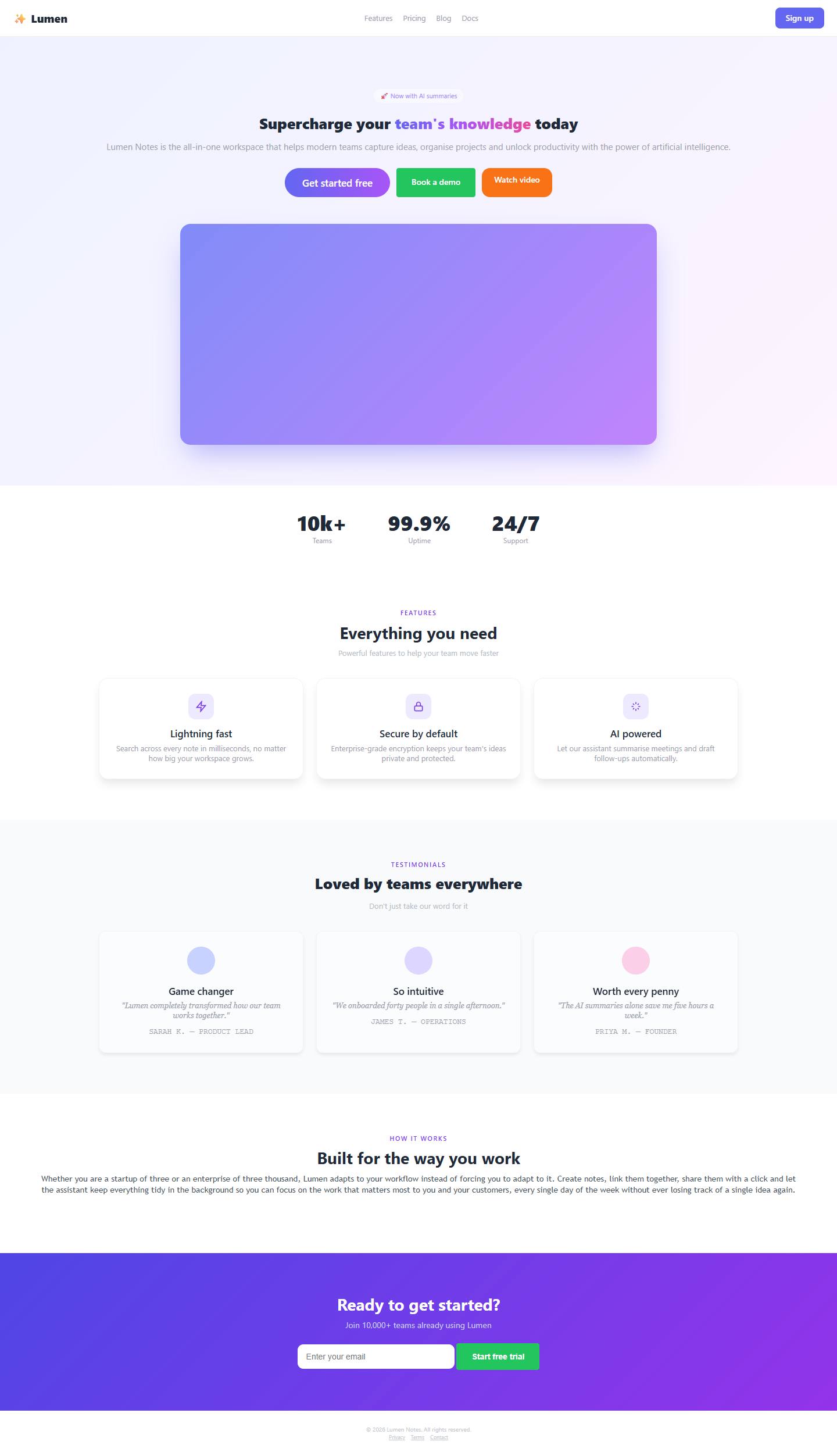
Desktop screenshot of lumen-notes.example, top of the page.
Desktop 1440 × 900
Mobile screenshot of lumen-notes.example, top of the page.
Mobile 390 × 844

Findings, in priority order

High priorityMeasuredTypography · Desktop · TYP-01

01 Too many typefaces

5 typefaces render visible text.

Evidence

Inter
58% of text
Trebuchet MS
27% of text
Georgia
10% of text
Courier New
4% of text
Arial
1% of text

Why it matters

Every extra typeface adds a new voice. Past two or three, the page stops feeling like one brand and starts feeling assembled.

Suggested fix

Pick one typeface for headings and one for body text (they can be the same family). Replace the rest.

Screenshot of the desktop page with the flagged element outlinedInter
Desktop capture, 1 of 4 flagged elements shown.
High priorityMeasuredTypography · Desktop · TYP-03

02 Body text is small

Most paragraph text is set at 13px.

Evidence

Dominant body size
13px
Recommended minimum
16px

Why it matters

Small body text makes people lean in or leave. It reads as dense and is harder for anyone with less than perfect eyesight.

Suggested fix

Set body text to 16px or larger and scale the other sizes up from there.

Screenshot of the desktop page with 3 flagged elements outlined
Desktop capture, 3 of 3 flagged elements shown.
High priorityMeasuredColor · Desktop · COL-02

03 Low-contrast text

22 text elements fall below the WCAG AA contrast minimum.

Evidence

Lowest ratio
1.66:1 (#c4c9d1 on #ffffff)
Failing elements
22 of 36 measured
Not evaluated
8 over images or gradients
  • #c4c9d1
  • #ffffff

Why it matters

Low-contrast text is the first thing to disappear on a dim screen or in sunlight, and it excludes readers with low vision.

Suggested fix

Darken the text or lighten the background until body text reaches 4.5:1 and large headings reach 3:1.

Screenshot of the desktop page with 4 flagged elements outlined1.7:11.7:11.7:11.7:1
Desktop capture, 4 of 5 flagged elements shown.
High priorityMeasuredSpacing · Desktop · SPC-01

04 Spacing doesn't follow a grid

100% of spacing values fall off a 4px grid.

Evidence

Off-grid share
100%
Most common off-grid values
22px, 26px, 13px, 70px, 11px, 15px, 7px, 9px

Why it matters

Spacing that lands on arbitrary values (13px here, 22px there) makes a layout feel slightly off, even to people who can't say why.

Suggested fix

Adopt a 4px spacing scale (4, 8, 12, 16, 24, 32, 48, 64, 96) and round every padding, margin and gap onto it.

High priorityMeasuredSpacing · Mobile · SPC-03

05 Page scrolls sideways on mobile

The page is 434px wider than the screen.

Evidence

Viewport width
390px
Document width
824px

Why it matters

Horizontal scroll on a phone makes the page wobble under the thumb and usually hides content off the right edge.

Suggested fix

Find the element wider than the screen (often an image, table or fixed-width container) and give it max-width: 100%.

High priorityMeasuredAccessibility · Desktop · A11Y-01

06 Images without alternative text

3 of 3 images have no alt attribute.

Evidence

Missing alt
3 of 3

Why it matters

Screen readers announce these images as a file name or skip them, and search engines learn nothing from them.

Suggested fix

Add alt text describing what each image shows. Use an empty alt (alt="") only for decoration.

Screenshot of the desktop page with 3 flagged elements outlined
Desktop capture, 3 of 3 flagged elements shown.
High priorityMeasuredAccessibility · Mobile · A11Y-05

07 Zooming is blocked on mobile

The viewport meta tag prevents pinch-to-zoom.

Evidence

Viewport meta
width=device-width, initial-scale=1, maximum-scale=1, user-scalable=no

Why it matters

People who need larger text rely on pinch-to-zoom. Blocking it locks them out of the content.

Suggested fix

Remove user-scalable=no and maximum-scale from the viewport meta tag.

Medium priorityMeasuredTypography · Mobile · TYP-06

08 Text too small to read on a phone

5 text elements are smaller than 12px.

Evidence

Smallest size
9px
Elements under 12px
5

Why it matters

Text under 12px is hard to read on a phone without zooming, so the information in it is effectively hidden.

Suggested fix

Raise captions, labels and legal text to at least 12px, ideally 13 to 14px.

Screenshot of the mobile page with 4 flagged elements outlined9px9px9px10px
Mobile capture, 4 of 5 flagged elements shown.
Medium priorityMeasuredHierarchy · Desktop · HIE-01

09 Page lacks a single main heading

The page has 2 h1 headings.

Evidence

h1 elements
2
Expected
1

Why it matters

The main heading tells visitors, search engines and screen readers what the page is about. Without exactly one, that message is missing or split.

Suggested fix

Mark the headline that states what you offer as the only h1, and use h2 for section titles.

Screenshot of the desktop page with the flagged element outlined"Supercharge your team's knowledge to…"
Desktop capture, 1 of 2 flagged elements shown.
Medium priorityMeasuredHierarchy · Desktop · HIE-03

10 Headings don't stand out from body text

A section heading (28px) is as large as the main heading (26px).

Evidence

h1 size
26px
Body size
13px
Ratio
2.00 (aim for 2.5 or more)
Largest h2
28px

Why it matters

Size contrast is what lets someone scan a page in five seconds. If headings and body are close in size, everything reads at one volume.

Suggested fix

Make the main heading at least 2.5 times the body size, and step each level down clearly (for example 56, 32, 22, 16).

Screenshot of the desktop page with the flagged element outlinedh1 26px
Desktop capture, 1 of 2 flagged elements shown.
Medium priorityDesign judgmentHierarchy · Desktop · HIE-04

11 No clear primary action on the first screen

3 differently colored filled buttons compete on the first screen.

Evidence

Filled buttons above the fold
3
Distinct button colors
3
  • #6366f1
  • #22c55e
  • #f97316

Why it matters

The first screen should answer "what do I do here?". With no prominent button, or several fighting for attention, visitors hesitate.

Suggested fix

Give the first screen one filled button in your accent color for the main action. Style any second action as an outline or text link.

A design opinion based on measurements. Reasonable designers can disagree.

Screenshot of the desktop page with 3 flagged elements outlined"Sign up""Book a demo""Watch video"
Desktop capture, 3 of 3 flagged elements shown.
Medium priorityDesign judgmentColor · Desktop · COL-03

12 Competing accent colors

4 unrelated accent hues are used across buttons, text and gradients.

Evidence

Accent hue families
4
Suggested maximum
2
  • #6366f1
  • #a855f7
  • #22c55e
  • #f97316

Why it matters

An accent works because it is rare. Several unrelated accents compete, and visitors can't tell which one marks the main action.

Suggested fix

Choose one primary accent for actions and at most one secondary. Express everything else in neutrals and tints.

A design opinion based on measurements. Reasonable designers can disagree.

Medium priorityMeasuredAccessibility · Desktop · A11Y-02

13 Form fields without labels

1 of 1 form field has no label.

Evidence

Unlabelled fields
1 of 1

Why it matters

A placeholder vanishes as soon as someone types, and assistive technology may not read it at all, so people can't tell what a field is for.

Suggested fix

Give every field a visible <label> connected with for/id, or an aria-label when the design has no room for one.

Screenshot of the desktop page with the flagged element outlinedemail
Desktop capture, 1 of 1 flagged element shown.
Medium priorityMeasuredAccessibility · Desktop · A11Y-04

14 Page language is not declared

The html element has no lang attribute.

Evidence

lang attribute
missing

Why it matters

Without a declared language, screen readers may pronounce the page with the wrong accent and browsers can't offer translation reliably.

Suggested fix

Add the language to the html tag, for example <html lang="en">.

Medium priorityCommon patternTemplate signals · Desktop · SIG-01

15 Purple-to-blue gradient

5 gradients use the indigo-to-purple range.

Evidence

Matching gradients
5
  • #eef2ff
  • #f5f3ff
  • #fdf4ff

Why it matters

This gradient is one of the most repeated looks on recent landing pages, so it makes a site harder to tell apart from many others.

Suggested fix

Replace it with a flat brand color, or build a gradient from colors that belong to your own palette.

A widely used default. It says nothing about how this site was made.

Screenshot of the desktop page with 4 flagged elements outlined
Desktop capture, 4 of 4 flagged elements shown.
Low priorityMeasuredTypography · Desktop · TYP-04

16 Body line spacing is off

Body text has a line-height of 1.30 (16.9px on 13px text).

Evidence

Line-height ratio
1.30
Comfortable range
1.45 to 1.65

Why it matters

Tight lines blur into a block; very loose lines stop reading as a paragraph. Both slow reading down.

Suggested fix

Set body line-height between 1.45 and 1.65.

Screenshot of the desktop page with the flagged element outlined
Desktop capture, 1 of 1 flagged element shown.
Low priorityMeasuredTypography · Desktop · TYP-07

17 Lines of text are too long

1 paragraph runs to about 206 characters per line.

Evidence

Longest line
~206 characters
Comfortable range
60 to 75

Why it matters

Past roughly 80 characters, the eye loses its place when it jumps back to the next line.

Suggested fix

Cap text blocks at 60 to 75 characters per line (a max-width of about 65ch).

Screenshot of the desktop page with the flagged element outlined~206 chars
Desktop capture, 1 of 1 flagged element shown.
Low priorityMeasuredHierarchy · Desktop · HIE-02

18 Heading levels are skipped

2 headings skip a level.

Evidence

h2 to h4
"Lightning fast"
h1 to h4
"Game changer"

Why it matters

Heading levels are the page's outline. Skipped levels confuse screen-reader navigation and usually mean headings were chosen for their size, not their role.

Suggested fix

Use levels in order (h1, then h2, then h3) and control the look with CSS instead of the tag.

Screenshot of the desktop page with 2 flagged elements outlinedh2 → h4h1 → h4
Desktop capture, 2 of 2 flagged elements shown.
Low priorityMeasuredColor · Desktop · COL-01

19 Too many text colors

7 distinct text colors are in use.

Evidence

#9ca3af
42% of text
#4b5563
27% of text
#1f2937
12% of text
#b6bcc6
9% of text
#ffffff
6% of text
#c7d2fe
2% of text
#a78bfa
2% of text
  • #9ca3af
  • #4b5563
  • #1f2937
  • #b6bcc6
  • #ffffff
  • #c7d2fe
  • #a78bfa

Why it matters

Each text color implies a different meaning. When there are many, none of them reads as intentional.

Suggested fix

Reduce to one main ink, one muted ink, one accent for links and actions, and white for text on dark surfaces.

Low priorityMeasuredSpacing · Mobile · SPC-04

20 Content touches the screen edge on mobile

9 text blocks sit within 8px of the screen edge.

Evidence

Blocks near the edge
9
Recommended gutter
16px or more

Why it matters

Text that runs to the edge of the glass looks unfinished and is harder to read.

Suggested fix

Give page content a side gutter of at least 16px on small screens.

Screenshot of the mobile page with 2 flagged elements outlined
Mobile capture, 2 of 4 flagged elements shown.
Low priorityMeasuredConsistency · Desktop · CMP-01

21 Buttons come in too many shapes

4 different button shapes are in use.

Evidence

8px radius, 36px tall
1 button
4px radius, 52px tall
1 button
14px radius, 52px tall
1 button
4px radius, 48px tall
1 button

Why it matters

Buttons are the most repeated component on a page. When each one is a slightly different shape, the whole interface feels improvised.

Suggested fix

Define two or three sizes with one corner radius, and build every button from them.

Screenshot of the desktop page with 3 flagged elements outlined8px radius4px radius14px radius
Desktop capture, 3 of 4 flagged elements shown.
Low priorityCommon patternTemplate signals · Desktop · SIG-02

22 Gradient-filled text

1 text element is filled with a gradient.

Evidence

Gradient text elements
1
  • #6366f1
  • #a855f7
  • #ec4899

Why it matters

Gradient headlines are a common template flourish. They also reduce legibility, because part of each word has lower contrast.

Suggested fix

Set the headline in a solid color and reserve emphasis for one word or a weight change.

A widely used default. It says nothing about how this site was made.

Screenshot of the desktop page with the flagged element outlined
Desktop capture, 1 of 1 flagged element shown.
Low priorityCommon patternTemplate signals · Desktop · SIG-04

23 Emoji used as icons

3 emoji appear in headings, buttons or lists.

Evidence

Emoji found
3
Example
"⚡"

Why it matters

Emoji look different on every device and can't be styled, so they read as placeholders where an icon set was never chosen.

Suggested fix

Swap them for one consistent icon set drawn in your brand color.

A widely used default. It says nothing about how this site was made.

Screenshot of the desktop page with 3 flagged elements outlined
Desktop capture, 3 of 3 flagged elements shown.
Low priorityCommon patternTemplate signals · Desktop · SIG-05

24 Rows of identical cards

2 sections are built from rows of identical cards.

Evidence

Card rows
2
Cards per row
3, 3

Why it matters

The three-card feature row is the most familiar block in template landing pages. Several of them in a row make a page feel generic.

Suggested fix

Vary the layout: lead with one feature at full width, pair text with a real screenshot, or use a list where items are simple.

A widely used default. It says nothing about how this site was made.

Screenshot of the desktop page with the flagged element outlined
Desktop capture, 1 of 2 flagged elements shown.
Low priorityCommon patternTemplate signals · Desktop · SIG-07

25 Nearly everything is centered

100% of text blocks are center-aligned.

Evidence

Centered blocks
19 of 19

Why it matters

Centering every block is the default when no layout was designed. It removes the left edge that makes text easy to scan.

Suggested fix

Center the hero and short statements only. Left-align paragraphs and anything longer than two lines.

A widely used default. It says nothing about how this site was made.

Screenshot of the desktop page with the flagged element outlined
Desktop capture, 1 of 3 flagged elements shown.
Low priorityCommon patternTemplate signals · Desktop · SIG-08

26 Heavy use of blurred glass panels

5 elements use a backdrop blur.

Evidence

Blurred panels
5

Why it matters

Frosted-glass panels are a recognisable trend. Used everywhere, they lower text contrast and date a design quickly.

Suggested fix

Keep the blur for one element that benefits from it, such as a sticky header, and give other panels a solid surface.

A widely used default. It says nothing about how this site was made.

Every check we ran

A check that could not run is listed as not evaluated. It never counts as a pass, and a category with nothing evaluated gets no score.

CheckCategoryViewportResult
TYP-01 Too many typefacesTypographydesktopFinding
TYP-02 No consistent type scaleTypographydesktopPass
TYP-03 Body text is smallTypographydesktopFinding
TYP-04 Body line spacing is offTypographydesktopFinding
TYP-05 Too many font weightsTypographydesktopPass
TYP-06 Text too small to read on a phoneTypographymobileFinding
TYP-07 Lines of text are too longTypographydesktopFinding
COL-01 Too many text colorsColordesktopFinding
COL-02 Low-contrast textColordesktopFinding
COL-03 Competing accent colorsColordesktopFinding
SPC-01 Spacing doesn't follow a gridSpacingdesktopFinding
SPC-02 Too many spacing valuesSpacingdesktopPass
SPC-03 Page scrolls sideways on mobileSpacingmobileFinding
SPC-04 Content touches the screen edge on mobileSpacingmobileFinding
CMP-01 Buttons come in too many shapesConsistencydesktopFinding
CMP-02 Inconsistent corner roundingConsistencydesktopPass
CMP-03 Too many shadow stylesConsistencydesktopPass
HIE-01 Page lacks a single main headingHierarchydesktopFinding
HIE-02 Heading levels are skippedHierarchydesktopFinding
HIE-03 Headings don't stand out from body textHierarchydesktopFinding
HIE-04 No clear primary action on the first screenHierarchydesktopFinding
HIE-05 Headline is below the first screen on mobileHierarchymobilePass
A11Y-01 Images without alternative textAccessibilitydesktopFinding
A11Y-02 Form fields without labelsAccessibilitydesktopFinding
A11Y-03 Tap targets are too smallAccessibilitymobilePass
A11Y-04 Page language is not declaredAccessibilitydesktopFinding
A11Y-05 Zooming is blocked on mobileAccessibilitymobileFinding
A11Y-06 Buttons or links without a nameAccessibilitydesktopPass
SIG-01 Purple-to-blue gradientTemplate signalsdesktopFinding
SIG-02 Gradient-filled textTemplate signalsdesktopFinding
SIG-03 Default typefaceTemplate signalsdesktopPass
SIG-04 Emoji used as iconsTemplate signalsdesktopFinding
SIG-05 Rows of identical cardsTemplate signalsdesktopFinding
SIG-06 Unmodified framework accent colorsTemplate signalsdesktopPass
SIG-07 Nearly everything is centeredTemplate signalsdesktopFinding
SIG-08 Heavy use of blurred glass panelsTemplate signalsdesktopFinding

Would you rather have this fixed for you?

We turn audits like this one into finished redesigns. Tell us about the site and we'll reply with a scope and a quote.